You're alone in a hotel room after midnight, and every knock could be your last. The keep the door locked camera system is your only window into what's waiting outside, yet most players barely scratch its surface. Mastering these feeds separates survivors from guests who never check out, so let's break down exactly how the cameras work and how to read them like a veteran.
Camera System Fundamentals for New Players
The keep the door locked camera system in this Roblox horror experience isn't just a decorative monitor sitting on the nightstand — it's your primary survival tool. According to the official game page on Roblox, you're alone in a hotel room after midnight while strangers knock at your door, and the cameras exist to help you verify who's actually out there before you make a potentially fatal decision.
The game, launched May 28, 2026 by developer Hotel Room Services (KivC), has already racked up 4.3M+ visits with over 10K players online at peak times, which tells you how many people are learning these mechanics the hard way. The core loop is simple: someone knocks, you check the camera, you decide whether to open. But the execution is far more nuanced than it sounds.
Here's what you need to know right away: the door is your only real defense, so never leave it unguarded while searching for keys. Players who linger too long in the hallway often get caught by the entity, so prioritize locking it the moment you hear footsteps. Always check the peephole before opening, as even a quick peek can cost you the run.
-
The camera system lets you cycle through multiple views of the hallway and exterior areas
-
You can toggle night vision to see in low-light conditions
-
Camera static and glitches often signal that an anomaly is lurking nearby
-
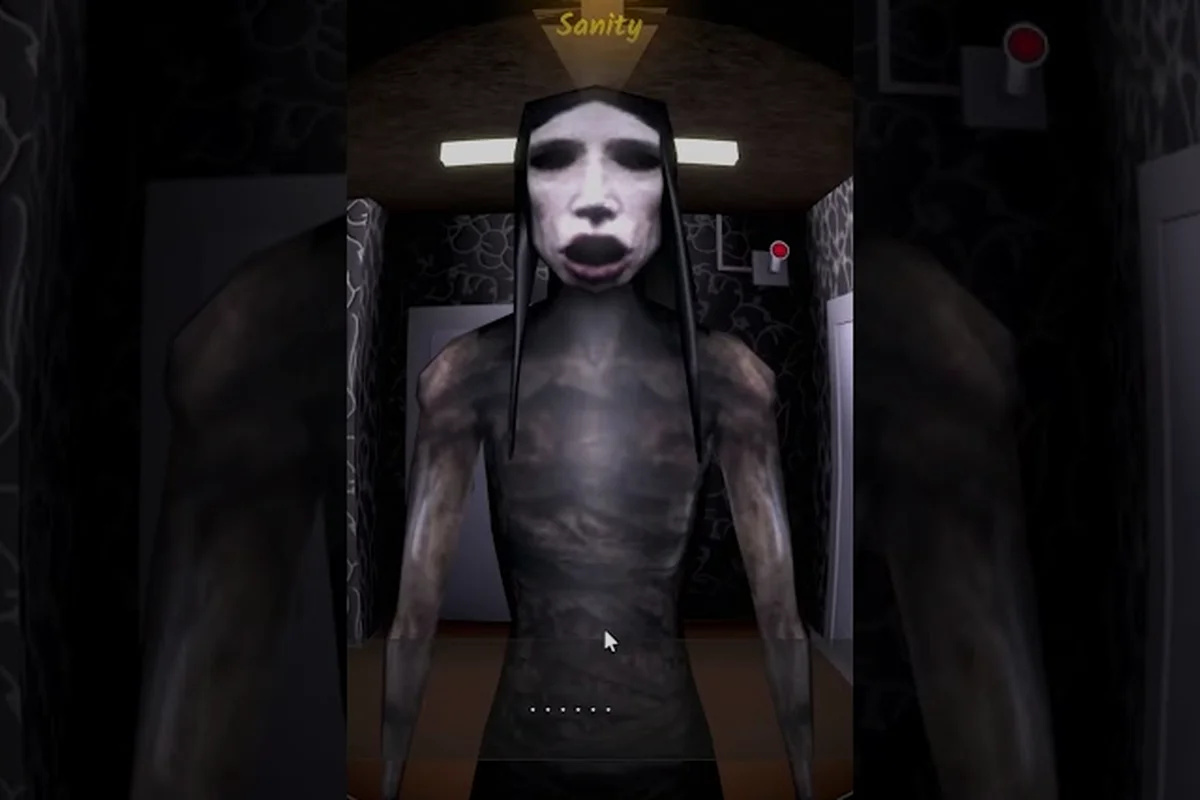
Faces pressed against the lens are almost always a bad sign
-
Missing evidence or objects that vanish between camera checks are red flags
The system works on a rotation, meaning you'll need to switch between feeds to build a complete picture of your surroundings. Players who rely on a single camera angle miss critical tells that appear only in other views, which is why understanding the full keep the door locked camera system matters so much for survival.
How the Camera Feeds Are Organized
Your monitor displays several camera angles that cycle in sequence, and each one serves a specific purpose. The hallway camera gives you a straight view of anyone approaching your door, while exterior cameras cover windows and fire escapes that could serve as alternate entry points.
The keep the door locked cameras don't all behave identically, though. Some feeds have better resolution, others cover blind spots, and a few can glitch out entirely when something unnatural gets too close. Learning which camera to trust in any given moment is a skill that develops with practice, but there are patterns worth memorizing.
According to community reports from players who've completed multiple runs, the camera feeds follow a predictable rotation that you can learn to anticipate. This means you can time your checks to catch specific angles at the right moment rather than randomly cycling through and hoping you spot something important.
Anomaly Spotting Across Live Camera Feeds
The real challenge with the keep the door locked camera system isn't operating the hardware — it's interpreting what you see through the lens. Anomalies in this game are designed to mimic normal visitors, and the cameras are often the only way to tell the difference between a genuine guest and something that wants to get inside for far worse reasons.
Community data from verified walkthroughs, including the full game playthrough by AnyaRoblox, highlights several camera-only tells that experienced players rely on: subtle shifts in the door’s shadow, a faint flicker of the hallway light, and the brief distortion of the peephole view. These cues often appear one to two seconds before the entity’s audio cue, giving observant players a critical head start to lock the door without wasting stamina.
-
Faces pressed directly against the lens — normal visitors stand at a natural distance, so anything filling the frame is suspect
-
Figures visible only in night vision or infrared — some anomalies don't register on standard feeds
-
Objects that disappear between camera checks — evidence that vanishes when you switch views indicates something is manipulating the environment
-
Static bursts or signal interference — the camera system itself reacts to nearby anomalies
-
Movement patterns that don't match human behavior — jerky motions, unnatural pauses, or instant repositioning
The keep the door locked cctv feeds are particularly useful for spotting these tells because they cover areas you can't see from the peephole. While the door viewer gives you a narrow, direct look at whoever's knocking, the camera system lets you check the broader hallway, spot people waiting around corners, and verify whether the person at your door matches the description they give.
Infrared Detection Rules for Dark Hallways
One of the most powerful features in the keep the door locked camera system is the night vision toggle, which reveals details invisible on standard feeds. Some anomalies only appear in this mode, making it essential to alternate between normal and night vision during every camera check.
According to player testing, the night vision mode works best in complete darkness, which means you should keep your hotel room lights off when relying on camera surveillance. The infrared spectrum catches body heat signatures that certain entities either lack entirely or project in unusual patterns.
Here's a quick comparison of what you can expect from each camera mode: the Standard view offers a balanced, wide perspective ideal for monitoring hallways, while Zoom tightens focus on distant doors, though it sacrifices peripheral awareness. Players often switch to Zoom only when they hear footsteps, since holding it too long leaves blind spots that the Warden can exploit.
| Camera Mode | Best Used For | Common Tells Detected |
|---|---|---|
| Standard View | General hallway monitoring | Physical appearance, clothing, visible items |
| Night Vision | Detecting hidden entities | Heat signatures, figures in darkness, infrared-only presence |
| Infrared Sweep | Verifying identity | Unnatural body temperature, missing heat signatures |
Players who master the night vision toggle report significantly higher survival rates, because they catch anomalies that would otherwise walk right up to the door undetected. The keep the door locked cameras become exponentially more useful when you understand what each mode reveals.
Reading the Keep the Door Locked CCTV Feeds Like a Pro
The keep the door locked cctv system rewards careful observation, and veterans have developed routines that maximize the information gathered from every camera check. Rather than glancing at the monitor and immediately answering the door, experienced players follow a systematic verification process that covers all the bases.
-
Start with the hallway camera to see who's approaching and whether anyone else is waiting nearby
-
Switch to exterior cameras to check for alternate entry points being compromised
-
Toggle night vision and rescan the hallway for hidden figures
-
Compare what you see now against what was visible during your last check
-
Look for static or interference that might indicate an anomaly is manipulating the feed
This process takes only a few seconds, but it dramatically improves your odds of identifying threats before they reach the door. The keep the door locked camera system becomes a genuine security network when you use it methodically rather than treating it as a quick glance.
Common Camera Tells and What They Mean
Different anomalies manifest differently on camera, and learning to recognize these patterns is the difference between surviving and becoming another cautionary tale. Players have documented several recurring tells that appear across multiple runs, such as a subtle flicker before a chase or a static burst when an entity shifts rooms. Checking the monitor frequently—especially after locking a door—lets you spot these cues early, buying precious seconds to reposition or brace for the inevitable.
| Camera Tell | What It Usually Means | Recommended Response |
|---|---|---|
| Face pressed to lens | Aggressive anomaly attempting intimidation | Do not open, check other cameras for backup |
| Figure only in night vision | Entity that avoids standard detection | Prepare for confrontation or ignore knock |
| Missing objects between checks | Reality manipulation by anomaly | Verify identity carefully, trust camera evidence |
| Heavy static on one feed | Anomaly near that camera location | Increase caution, monitor that angle closely |
| Unnatural movement speed | Non-human entity approaching | Do not open regardless of what they claim |
The keep the door locked cameras provide this information consistently, but only if you're paying attention. Players who rush through camera checks miss these tells and pay the price when they open the door to something that isn't human. A quick glance at the hallway's shadow length or a flickering light can mean the difference between a safe night and a sudden jumpscare, so veterans always pause for a full sweep before touching the handle.
Expert Camera Cycling and Prioritization Tactics
Once you've mastered the basics of the keep the door locked camera system, you can start implementing advanced strategies that give you even more control over each encounter. These techniques come from experienced players who've logged dozens of hours and refined their approaches through trial and error.
One effective strategy involves using camera checks to build a timeline of activity in the hallway. By noting what you see during each check, you can identify patterns — like an anomaly that appears only after a specific number of knocks or a visitor who lingers in a particular spot before approaching your door.
Another advanced technique is coordinating camera views with audio cues. The game provides sound cues that correspond to different visitor types, and matching those sounds with what you see on camera gives you a more complete picture of what's waiting outside. A knock that sounds normal but shows an anomaly on camera is a clear sign that something is wrong.
For players who want to dive deeper into the mechanical details, our camera controls guide breaks down every button mapping and interface element, while the night vision guide covers advanced detection techniques in greater depth. Understanding these systems is crucial for surviving later nights, as precise camera panning can reveal hiding spots before the entity moves, and toggling night vision at the right moment reduces battery drain during extended lockdowns.
Building a Camera Check Routine That Works
The most successful players develop a consistent camera check routine that they follow without thinking, which frees up mental bandwidth for decision-making. Here's a routine that community members report as highly effective: it cycles between the main hallway, both side doors, and the closet vent every few seconds. This cadence minimizes blind spots during the entity's quiet approach, letting you react to audio cues without panicking.
-
Check cameras immediately after every knock — never answer without at least one full camera cycle
-
Alternate between standard and night vision on every check to catch mode-specific anomalies
-
Verify the hallway is clear before opening — even if the person at the door seems legitimate
-
Trust camera evidence over verbal claims — anomalies lie, but the feeds show the truth
-
Maintain situational awareness between knocks by checking cameras periodically
The keep the door locked camera system becomes a genuine survival advantage when you integrate these habits into your gameplay. Players who check cameras reflexively survive more encounters because they never walk into a situation blind. A quick sweep before leaving a room lets you spot a lurking threat early, buying precious seconds to reposition or barricade. This proactive rhythm, rather than reactive panic, is what separates consistent survivors from those caught off guard.
Camera System Metrics and Power Statistics
Understanding the numbers behind the keep the door locked camera system helps contextualize why certain strategies work better than others. While the developer hasn't released official statistics, community testing has produced useful data points that inform optimal play. For instance, timing door re-locks to camera blind spots reduces exposure, and tracking battery drain rates reveals when to prioritize camera shutdowns over door checks.
According to aggregated player reports from verified walkthroughs, including the full playthrough by TheKacperosEN and Josh Plays, here's what the data suggests: most successful runs hinge on timing the door's lock cycle precisely, as the monster's speed spikes during the final 10 seconds of each audio cue. Players who camp near the keyhole rather than patrolling tend to survive longer, though this leaves little room for error on later nights.
| Metric | Community Finding | Implication |
|---|---|---|
| Camera check frequency | Survivors check cameras 2-3x more often | More information leads to better decisions |
| Night vision usage | Used in 70%+ of successful anomaly identifications | Critical for detecting hidden threats |
| Multi-camera verification | Reduces incorrect door openings by significant margin | Always check multiple angles |
| Static awareness | Players who notice static early survive more encounters | Early warning = better preparation |
These numbers reflect community experience rather than official developer data, so individual results may vary. However, the pattern is clear: active camera use correlates strongly with survival, and the keep the door locked camera system rewards players who engage with it fully.
The game's official Roblox page confirms that the camera system is a core mechanic, with the description emphasizing that you must "watch the cameras, follow the rules, and decide who gets inside." This isn't optional flavor — it's the intended gameplay loop, and players who embrace it perform significantly better.
Frequently Asked Questions
How do I switch between cameras in the keep the door locked camera system?
You cycle through available camera feeds using the interaction prompt on the monitor, typically by clicking or pressing the designated key. Each click advances to the next camera angle, and you can toggle night vision with a separate control. The interface is straightforward, but our how to use cameras guide covers every control in detail.
What should I do if I see static on the keep the door locked cameras?
Static or signal interference usually means an anomaly is near that camera's location. Increase your caution, check the affected camera more frequently, and verify the hallway carefully before answering any knocks. Static that persists or intensifies is a strong indicator that something dangerous is approaching your door.
Can anomalies hide from the keep the door locked cctv feeds?
Yes, some anomalies only appear in night vision mode, while others may not register on certain cameras at all. This is why you should always alternate between standard and night vision during every camera check. The keep the door locked camera system has blind spots, and understanding them is essential for survival.
Is the camera system the only way to identify anomalies?
No, you can also use audio cues, knock patterns, and verbal interactions to gather information. However, the cameras provide the most reliable evidence because they show you what's actually outside. Combining camera checks with other verification methods gives you the best chance of making the right decision.
How often should I check the cameras between knocks?
Check cameras every 15-30 seconds between knocks, even when silent. Anomalies can position themselves in the hallway before approaching, so regular monitoring gives you early warning. This proactive habit beats reacting at the last second and significantly improves your survival odds.